
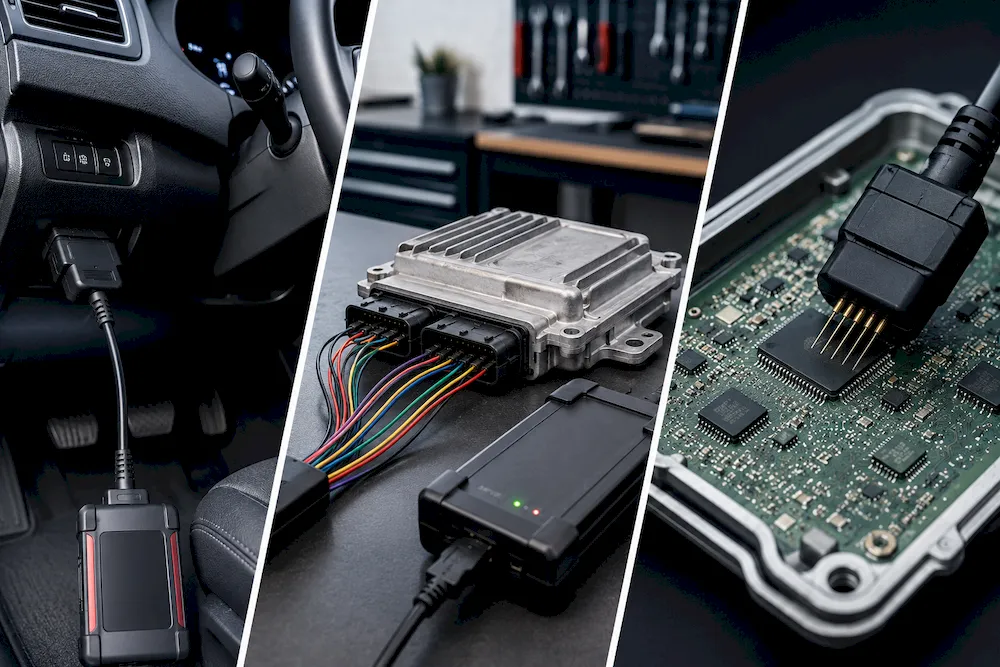
OBD, Bench and Boot Mode: What Is the Difference
When working with an ECU or TCU, technicians often see three common programming methods: OBD, Bench, and Boot mode. These methods are used to read or write data from a vehicle control unit, but they are not the same.
The correct method depends on the ECU type, vehicle, programming tool, and the condition of the control unit. Understanding the difference can help technicians choose the right equipment and reduce the risk of damage.
What Is OBD Mode?
OBD mode is usually the easiest programming method. The programming tool connects to the vehicle through the OBD diagnostic port, which is normally located under the dashboard.
The ECU stays inside the vehicle, so there is no need to remove or open it. This makes OBD programming faster and more convenient for many workshop jobs.
Advantages of OBD Mode
- Quick and easy connection
- No need to remove the ECU
- No need to open the ECU case
- Suitable for many common reading and writing jobs
However, OBD mode is not supported by every ECU. Some control units may also limit access to certain data through the diagnostic port.
A stable battery support unit is important during OBD programming. If the vehicle voltage drops or communication is interrupted, the programming process may fail.
What Is Bench Mode?
Bench mode requires the ECU to be removed from the vehicle. The technician connects the programming tool directly to the ECU pins or connector while the control unit remains closed.
This method is called Bench mode because the ECU is normally placed on a workbench during the operation.
Advantages of Bench Mode
- Direct communication with the ECU
- No need to open the ECU housing
- Useful when OBD access is not available
- Can support reading, writing, backup, and recovery functions
Bench mode requires the correct pinout, cables, and power connections. The technician must connect the power, ground, ignition, CAN, or other required lines correctly.
An incorrect connection may prevent communication or damage the ECU and programming equipment.
What Is Boot Mode?
Boot mode is a more advanced programming method. The ECU must usually be removed from the vehicle and opened. The technician connects the programming tool to specific pins, pads, or points on the circuit board.
Boot mode provides deeper access to the ECU memory and processor. It is often used when OBD and Bench methods are not available or when an ECU needs repair or recovery.
Advantages of Boot Mode
- Deep access to ECU memory
- Can read flash and EEPROM data
- Useful for ECU cloning
- Can help recover damaged or locked control units
- Suitable for advanced repair work
Boot mode requires more technical skill because the ECU must be opened carefully. Incorrect connections, damaged circuit board points, static electricity, or water entering after reassembly may cause serious problems.
Which Programming Method Should You Use?
Use OBD mode when it is supported and you need a quick, simple connection through the vehicle. It is often the best choice for normal reading, writing, and software update work.
Use Bench mode when the ECU must be removed but does not need to be opened. This method is useful for direct communication, backup, repair, and control unit replacement work.
Use Boot mode when deeper memory access is needed or when other methods cannot communicate with the ECU. It is commonly used for advanced programming, cloning, and recovery.
Important Safety Steps
Before starting any ECU programming job, always check the tool support list, ECU model, connection diagram, and required method.
Use a stable power supply, create a backup when possible, and never disconnect the tool during reading or writing. ECU programming should be completed by trained professionals using compatible equipment.
DJ Autotech provides ECU programming tools, cables, adapters, and software for OBD, Bench, and Boot mode operations. Contact our team with your ECU information to find a suitable solution.




Add comment